The {show} / {hide} tags are not being converted
The Conditional Content plugin is not published
Check if the Conditional Content plugin is published. Go to System > Manage > Plugins and search for the system plugin System - Regular Labs - Conditional Content. Then publish it.
There is markup on the plugin tags
If you have copy/pasted code directly into your editor, you might also have copied along hidden HTML tags. So this will also cause the {show} / {hide} tags to break:
{<span>show</span> ...}
Remove the extra styling or other html tags around and in the tags that might cause problems.
How safe is the hiding of the content?
When Conditional Content processes a block, {show} includes its main content when the conditions match, while {hide} excludes its main content when they match. If an alternative branch is provided, it is used when the main content is excluded.
The excluded content is removed from the processed HTML, rather than merely hidden with CSS. This applies to the output processed by the plugin; it does not protect the original content through other access routes or prevent a cache from serving previously generated output. Use Joomla access controls for content that requires access restrictions, and check the caching guidance below.
The {show} / {hide} tags are seen in the Search component
Search tools that read stored article text without processing the plugin tags can display the tags or content from branches that would be excluded on the page.
Conditional Content supports Joomla Smart Search indexing. It evaluates the indexed article content as a guest, so the indexing administrator's permissions do not determine which branch is included.
The result is a snapshot of the content selected during indexing, not a fresh evaluation for each person searching. Rebuild the Smart Search index when changes to the content or its conditions need to be reflected in search results. Conditions based on time or other request details can produce different results on the live page.
How does caching affect Conditional Content?
If a cache stores the output after Conditional Content has processed it, subsequent requests can receive that stored output without the conditions being checked again. A cache that distinguishes only the URL and language may reuse the wrong content for conditions based on the visitor, device, or date and time.
Configure caching so that requests which need different conditional content do not share the same cached output, or exclude the affected content or pages from caching. Date and time conditions also need the cached output to expire or be refreshed when the condition changes.
Turning off caching for a module affects that module's cache only. A full-page cache, reverse proxy, or CDN may still cache the resulting page. Check all caching layers serving the affected page, and clear existing cached output after changing the configuration.
How to prevent the URL condition also matching urls you don't want
The URL condition will match any url that contains the part you place in the URL assignment field.
For instance, if you place foobar=1 in that field, it would match any of these urls:
index.php?foobar=1
index.php?foobar=1&baz=qux
index.php?foobar=10
index.php?baz=qux&foobar=123
Let's say you only want it to match the first 2 urls, but not the other 2 that have a number starting with a 1 but are not 1.
The solution is to use Regular Expressions.
In this case you want the assignment to only match urls containing foobar=1 but is either followed by something other than a number or is at the end of the url.
In that case, this assignment should work (with the Regular Expressions option on):
foobar=1([^0-9]|$)
To explain:(...|...) match any of these possibilities.[^0-9] match any character that is not a number.$ match the end of the string.
More on Regular Expressions
For documentation on regular expressions, check out the Regular Expressions Cheat Sheet.
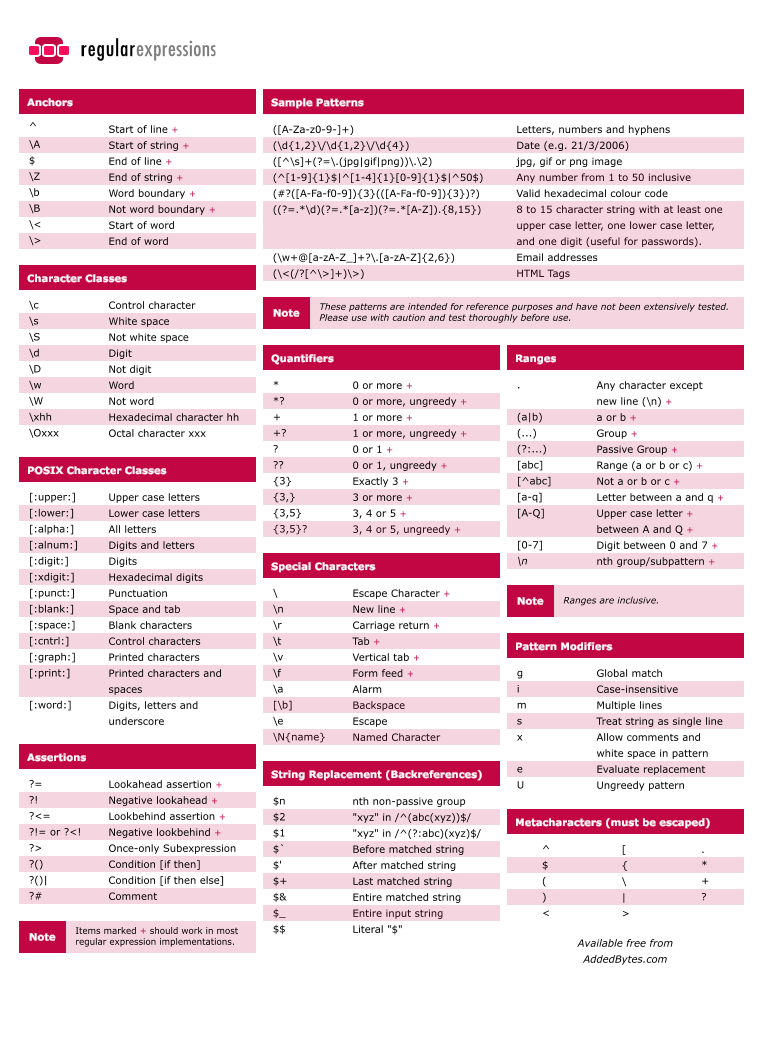
For more info on Regular Expressions: http://www.regular-expressions.info/reference.html
For testing them: http://gskinner.com/RegExr, http://regexpal.com, http://www.phpliveregex.com
I want to use a condition for something that is not available
If you are using the FREE version, see if the condition is available in the PRO version.
In the PRO version there is also the ability create a condition using custom PHP code. This gives you the opportunity to show/hide your content based on just about anything you can think of. You just need to know what PHP code you should use.
With PHP you can call on all data/information available in the variables, url, database, etc. And then do your checks on this data. You can tell Conditional Content to show/hide the content by ending the PHP code with a return true or false based on your checks.
For examples and ready-to-use PHP scripts, please see the PHP Conditions Guide.