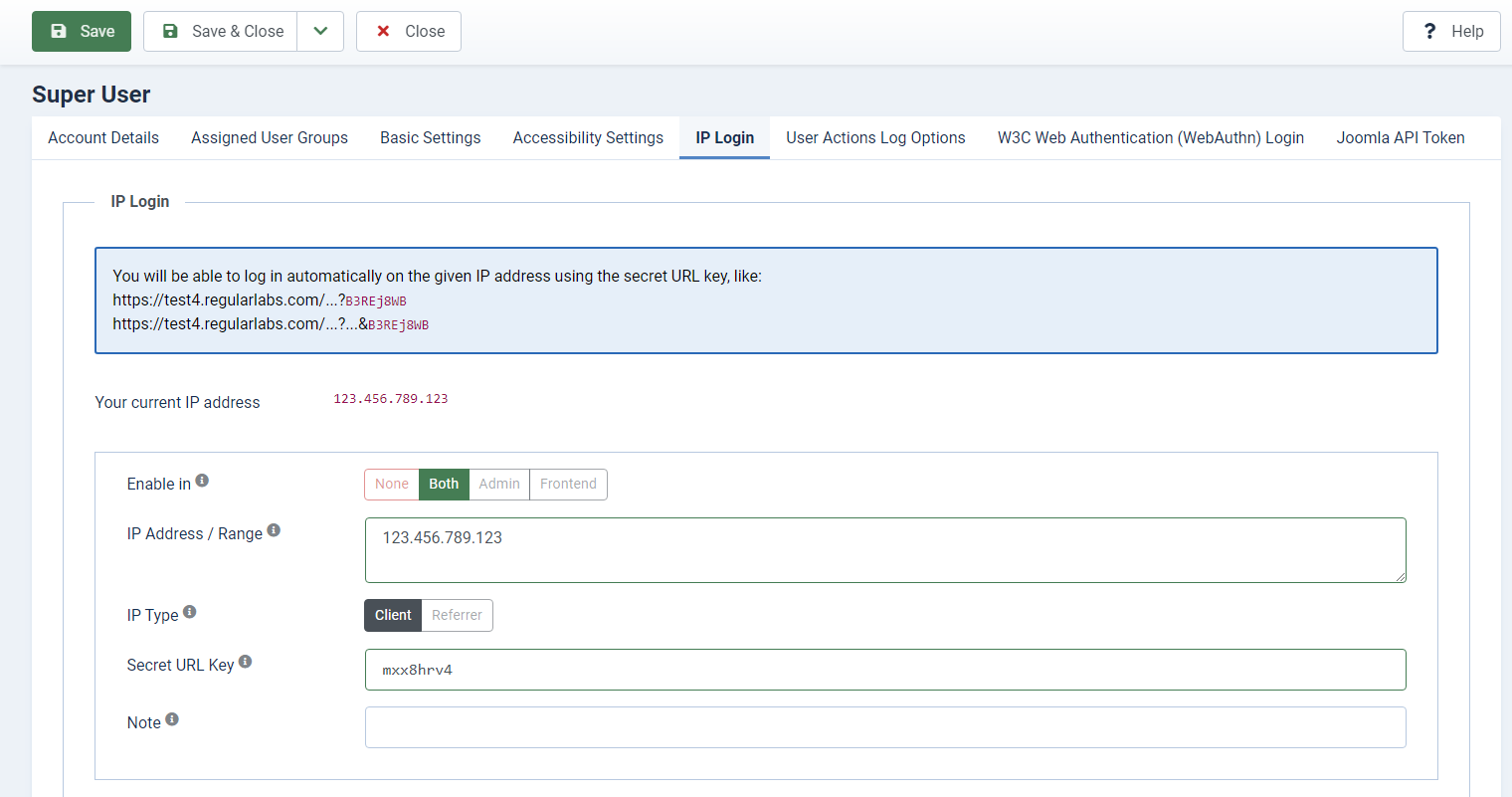
You can configure IP Login in each user profile in the Joomla administrator.
Free supports one exact client IP address and one secret URL key per user. IP lists, wildcard and from-to ranges, referrer-IP matching, notes and setups two through five are Pro-only.
Enter the IP address that may use the login. Leave the key field empty to generate a high-entropy, URL-safe key automatically, or replace it before saving if necessary. The generated value is recommended.
With the above example, you will be able to automatically log in on IP address 192.0.2.123 with URL key mxx8hrv4.
The URL key is added to the URL as a standalone query token, like:
https://www.yourdomain.com?mxx8hrv4
If the URL already contains a ?, you can prepend the key with an &, like:
https://www.yourdomain.com/administrator/index.php?option=com_content&mxx8hrv4.
Remove URL Key
After processing an automatic login, IP Login redirects back to the requested page. The Remove URL Key setting controls whether the matched standalone key is removed during that redirect. Other query parameters are preserved.
- No: Keep the URL key in both the frontend and administrator.
- Yes: Remove the URL key in both the frontend and administrator.
- Administrator: Remove the URL key only in the administrator.
- Frontend: Remove the URL key only in the frontend.
If an already logged-in user opens a URL containing one of their own configured keys, the same area-specific removal setting applies.
Multiple Setups PRO
With the Pro version of IP Login, you can configure up to five setups per user, each with its own key and restrictions. Pro setups can use IP lists, wildcards and from-to ranges, referrer-IP matching and notes.
Client IP Addresses
Both Free and Pro accept exact IPv4 and IPv6 addresses. Equivalent compressed and expanded forms of the same IPv6 address match. Pro also supports IP lists and wildcard and from-to ranges.
Behind a Proxy or CDN
Check Your current IP address in your user profile. If your site is behind a reverse proxy, load balancer or CDN, this may show the proxy address instead of your own.
Configure the proxy's addresses or CIDR ranges in the Regular Labs Library plugin's trusted proxy setting. Forwarded client-IP headers are used only when the server's direct connection comes from one of those trusted proxies. Otherwise, IP Login uses the direct connection address.
Use the proxy provider's documented ranges and ensure that the proxy supplies the visitor's IP correctly. Do not enter visitor addresses or unrestricted ranges as trusted proxies. Ask your hosting provider for the correct setup if needed.
Referrer Matching PRO
Select IP Type → Referrer in a Pro setup to compare the configured address with the IP of the referring host instead of the visitor. This replaces client-IP matching; it does not require both addresses to match. If the referrer host is already an IP address, it is used directly. If it is a domain name, the hostname is resolved on the server to an IPv4 address before matching.
The HTTP Referer header is supplied by the request. Browsers and privacy tools can omit or alter it, and a requester can forge it. Referrer matching is therefore an additional restriction only; it is not proof of where a request originated and does not replace a private secret URL key.
A missing referrer or an unresolvable hostname cannot match a specific address or range. A lone * bypasses address matching, including in Referrer mode.
Keeping Your Login URL Private
The secret URL key is the primary login credential. Always use IP Login over HTTPS, keep the key private and rotate it if it is exposed. IP or referrer matching is an additional restriction, not a replacement for a strong key.
Removing a key from the address bar does not invalidate it or remove it from existing logs or saved links. Keys remain reusable until you change them. Keep the original login URL private even when Remove URL Key is enabled.
IP addresses can change or be shared. IP Login checks the address when using the key to log in; it does not continuously check an existing session or log you out when your IP changes.